The front office for flight training
More students in the airplane, less paper on the desk
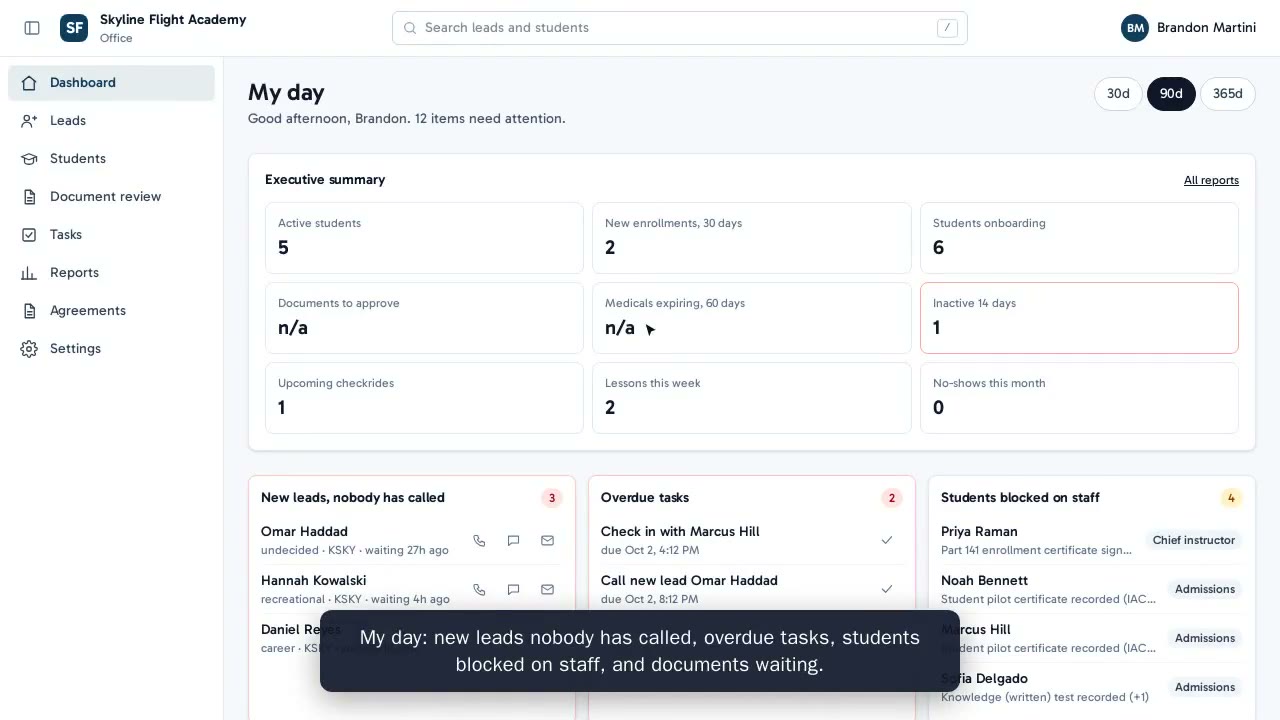
Flightdesk answers every inquiry, gets enrollment paperwork signed on the student's phone, and keeps medicals and IDs current so nobody finds out at the airplane. All of it in your school's name. Watch four minutes of a Monday morning with Flightdesk, then book a walkthrough.
In private rollout with partner schools in Southern California.
Book a demo
Thirty minutes with your school's name on it
Tell us a little about your school and we will reply by e-mail to pick a time. We set up a sample account in your school's name and walk through a Monday morning together. No preparation and no commitment.
- We reply by e-mail to pick a time
- We set up a sample account in your school's name
- We walk through it together and answer your questions
No big switch
We start with the front door and add the rest as your office is ready. Your students come over from the spreadsheets you already have, nothing reaches a student until you have approved it, and we stay with your school through the first weeks.
Already with a Flightdesk school? Sign in instead
Monday, 7:40 am
The inquiry that came in overnight already has a reply
Someone asked about a discovery flight at 11 pm. They did not wait in an inbox until Tuesday. They got a friendly reply from your school first thing in the morning with a Saturday slot to pick, and admissions opens the day with someone ready to talk.
- Discovery flight booking from your own website
- Follow-up by e-mail and text, in your school's name, never late at night
- One simple list of who inquired, who booked and who needs a call
Monday, 9:15 am
The enrollment packet signed before the first lesson
A new student fills in the enrollment form once, on their phone, and signs your agreements online. Photo ID and medical go in from the phone camera, and your office sees what is still missing before the first lesson. Nobody retypes a thing.
- Students register themselves from a link or QR code
- Online signatures, with a signed PDF you keep
- A checklist of what each student still owes, visible to them and to you
Monday, 10:30 am
Know who is legal to fly before anyone walks to the airplane
Every student carries their own record: medical, photo ID, TSA citizenship check, enrollment. Flightdesk watches the dates, asks the student for what is missing, and puts a hold on the schedule the day something lapses. Nobody finds out standing next to the airplane.
- Medical, photo ID and TSA citizenship records for every student
- A heads-up weeks before anything expires, and a hold on the schedule the day it does
- Students upload the new document from their phone, and a staff member checks it before it counts
Monday, 4:00 pm
One front office for every location, with your name on the door
Run one airport or five from a single place. Owners see the whole school, instructors see their own students, and the office sees its list. Reports show who inquired, who enrolled and who is current to fly.
- Students and staff see your school's name and colors, not ours
- No passwords. Staff and students sign in with a code sent to their e-mail.
- Reports for the school, for each instructor and for each student
Questions schools ask first
Does it replace our scheduler?
No. Flightdesk runs the front office: inquiries, enrollment, documents and keeping students legal to fly. It works with your scheduler and the tools you already use. Ask us about yours.
We run more than one location. Does that work?
Yes. Each location has its own list and its own staff, and the owner has one view across all of them.
Whose data is it?
Yours. It is stored in the United States, you can download all of it whenever you like, and the security overview has the details.
Book a demo
See a Monday morning with your school's name on it
Watch the four-minute video, then tell us about your school. We will reply by e-mail to pick a time, set up a sample account in your name and walk through it together. No preparation and no commitment.
 Watch the demo again
In private rollout with partner schools in Southern California.
Already with a Flightdesk school? Sign in instead